What this does: The Activity log is the complete record of everything that has happened on a request — when it was published, when your client opened it, every answer submitted, every reminder sent, every review action taken by your team. It builds itself as the request progresses, and you can filter it, search it, and export it to CSV.
Before you start
There is nothing to switch on. Every request has an Activity log from the moment it is created, and events are recorded automatically.
How to access the Activity Log
The Activity Logs can be found in 3 places.
1. Field specific activity log:
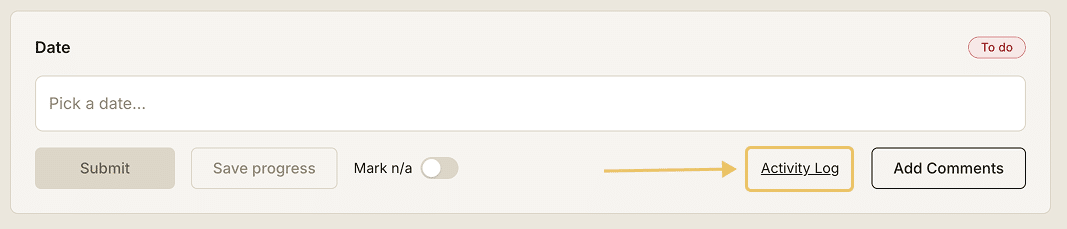
- Open any request and head to step 3. Request Preview
- Each field has an Activity Log section that can be clicked
- Click Activity Log to open up the list of actions
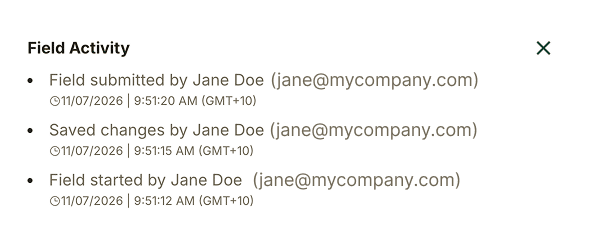
2. Request activity logs – PDF export
Select “Include activity logs” when requesting a pdf download.

3. Request activity logs – Step 4: Share & Track
- Open your request.
- Go to step 4: Share & Track.
- Select the Activity log tab, after the Publish & share and Responses tabs.
The log opens with the full history of the request, newest first, grouped by day.
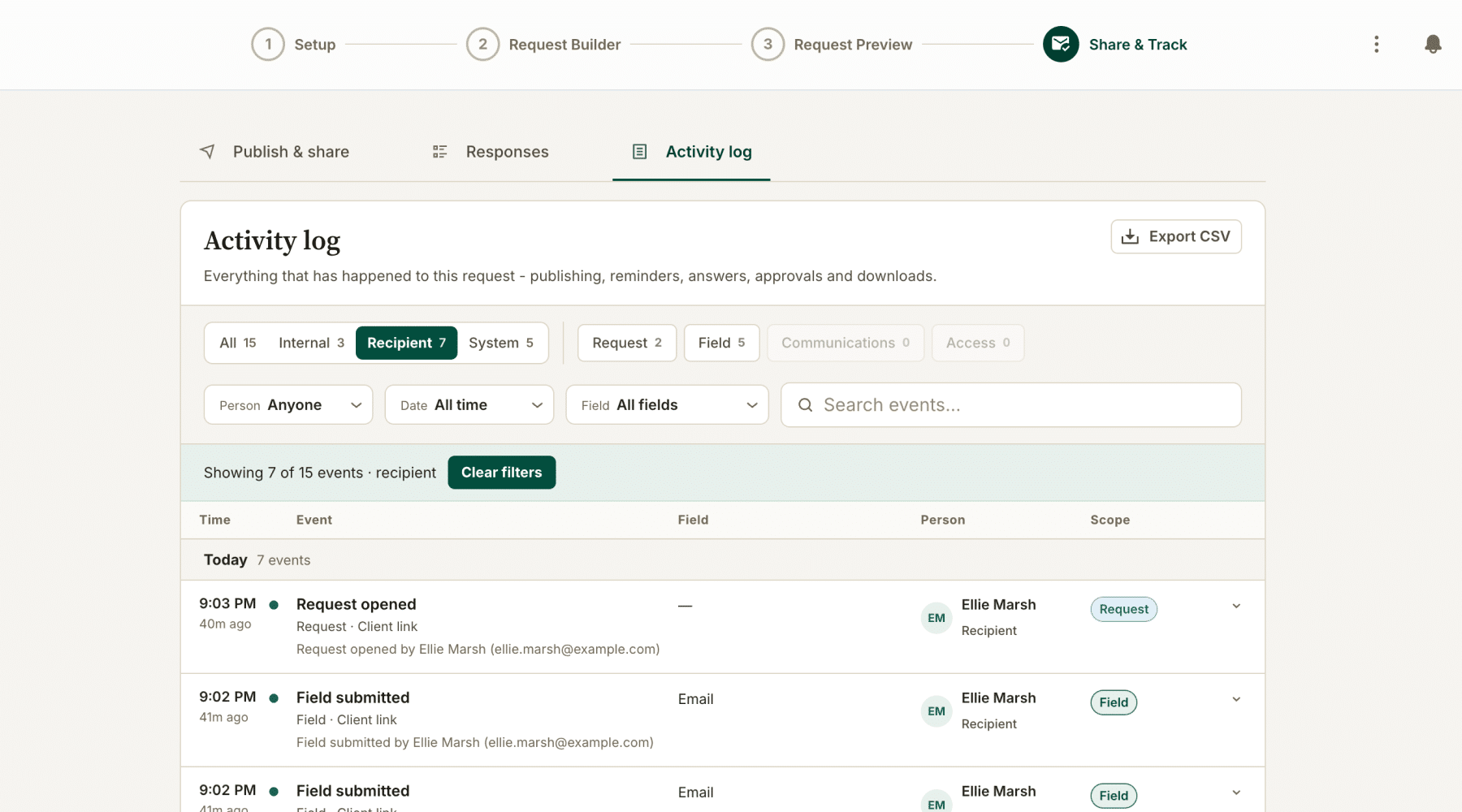
Reading the entries
Each row is one event, set out across five columns.
- Time: the time the event happened, with how long ago that was.
- Event: what happened, the category and where it came from (client link or team member), and a plain-English description naming the person involved.
- Field: the question the event relates to. Request-level events show a dash.
- Person: who triggered the event, and whether they are internal to your team or a recipient.
- Scope: whether the event relates to the request, a field, communications or access.
Filtering the log
Two rows of filters sit above the table.
The first row filters by who:
- Internal: actions taken by your team.
- Recipient: actions taken by the people you sent the request to.
- System: actions Gatheroo took automatically, such as sending a scheduled reminder.
The second row filters by what:
- Request: publishing, opening, submission, completion.
- Field: individual answers submitted, marked complete or queried.
- Communications: reminders and other messages sent.
- Access: access and permission events.
Below those are three drop downs and a search box:
- Person: narrow to one team member or recipient.
- Date: narrow to a date range.
- Field: narrow to a single question.
- Search events: free text search across the log.
The count beside each filter tells you how many events it will return, so you can see whether it is worth applying before you click it.
Exporting the log
Click Export CSV at the top right of the Activity log. This downloads the log as a spreadsheet file you can keep with your file notes, attach to a matter, or hand to an auditor.
What the Activity Log records
- Request created, published, and sent
- Each time the request link was opened by a client
- Individual field completions (with timestamp)
- File uploads
- Request submission
- Reminder emails sent
- Team member actions (comments added, request reassigned, etc.)
Using the Activity log to support your compliance obligations
The log is written automatically and cannot be edited.
That gives you a timestamped record of what you asked for, when you asked for it, when your client opened the request, what they provided and when, and what your team did with it afterwards.
For businesses with record-keeping, due diligence or identity verification obligations, that record supports your obligations without anyone having to remember to document anything.
The CSV export means you can produce it on request rather than reconstructing it from an inbox.
Notes
- The log covers one request.
- Events are grouped by day and paginated, so scroll or page through for older activity on long-running requests.
- Review actions appear here as well as in the Responses tab, so the review history and the submission history sit in the same record.