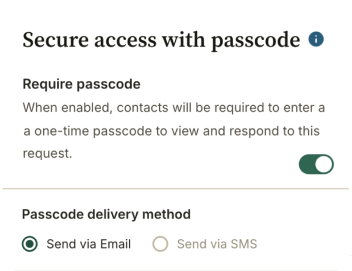
What this does:
Secure Access lets you add an extra layer of protection to a specific request. When enabled, clients must enter a passcode before they can open the request link.
This means that even if someone else intercepts the email and clicks on the link, they won’t be able to see any of the information until they have entered a separately sent Passcode.
This code changes each time they access the request for security reasons. This also removes the need for them to remember a password or code over time.
How to turn on Secure Access:
- Open the request you want to protect.
- Go to the Request Settings tab.
- Find the Access section.
- Toggle Require Passcode on.
- Depending on your plan, you may be able to select for the code to be sent by SMS.
- Click Save.