If a regulator asked your firm today to produce a clear, timestamped record of every client identity document collected in the past two years: who submitted it, when, and what they declared… could you do it?
For most accounting firms still relying on email for document collection, the honest answer is no.
This is not a problem solved by changing the people. It is a problem solved by using the right tools for the job.
Email was never designed for structured, auditable document collection. It has no compliance trail, no automated follow-up, no access controls, and no way to demonstrate due diligence if something goes wrong.
A purpose-built client portal for accountants fixes this.
Not just by making the process more efficient, but by making it defensible.
This guide is for practice managers, operations leads, and senior team members who are responsible for how client information is collected in their firm. It covers what a proper portal must do, where most tools fall short, and what to look for if you are evaluating options now.
Note: This article provides general information only and does not constitute legal or compliance advice. Consult a qualified adviser for guidance specific to your practice and obligations.
What Is a Client Portal for Accountants?
A client portal is a secure, web-based workspace where clients upload documents, complete forms, and sign declarations without sending anything by email.
For accounting firms, this means collecting tax records, financial statements, identity documents, and compliance declarations through a structured, branded process that creates a clear record of everything received.
The critical distinction is between a file storage tool and a document collection tool.
Platforms like Dropbox or Google Drive can hold files once they arrive.
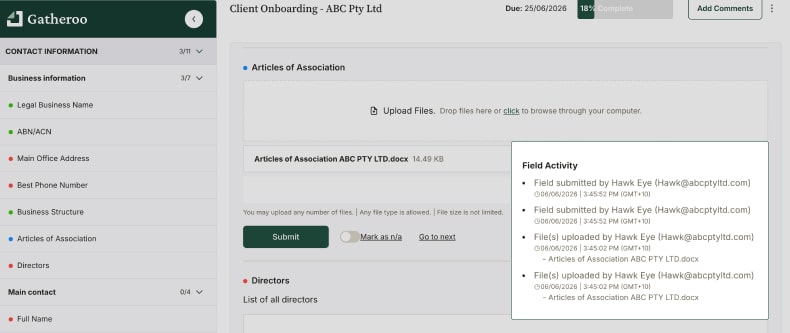
A proper client portal manages the entire process to that point: it guides clients to submit the right documents in the right format, sends automated reminders until the request is complete, and logs every action with a timestamp.
That last part matters far more than most firms realise until they need it.
Who Needs a Client Portal?
Any accounting or bookkeeping firm that collects sensitive information from clients as a core part of its work.
That includes tax agents, business advisers, SMSF administrators, and bookkeepers, but the decision to implement a proper portal typically sits with the person responsible for how the firm’s systems and processes work: a practice manager, operations lead, or senior team member who has seen the current process break down and is tasked with fixing it.
Compliance obligations make this urgent.
In Australia, the Tranche 2 AML/CTF reforms are set to bring accounting and bookkeeping firms into the regulated sector, requiring customer due diligence, identity verification, and records of what was collected and when.
A portal with a proper audit trail is not a nice-to-have under those obligations. It is the baseline.
Firms in other jurisdictions should confirm equivalent requirements with their local regulatory body.
Either way, the direction of travel is the same: regulators expect a structured, auditable process. Email does not provide one.
What a Client Portal for Accountants Must Actually Do
1. Create a defensible audit trail
This is the feature most portals underdeliver on, and the one that matters most when something goes wrong.
You need a record of when each request was sent, when each document was received, what the client acknowledged, and who on your team accessed the submission.
Not a folder of files with upload dates. A proper, timestamped activity log that you can present to an auditor or regulator without preparation.
If a portal cannot produce that, it has not solved the compliance problem.
2. Support KYC and identity verification at onboarding
For firms with customer due diligence obligations and increasingly, that means most professional services firms, the portal needs to handle KYC as part of the new client workflow.
That means collecting a government-issued photo ID, proof of address, source-of-funds declarations, and a signed client acknowledgement, all within a single structured request.
Building this into onboarding from day one is far easier than retrofitting it across an existing client base.
For a detailed look at what a compliant onboarding process involves, see our guide to KYC and client intake for professional services firms.
3. Enforce structure – not just storage
A portal that accepts any file in any format has not improved on email.
The portal needs to guide clients through a specific checklist: what is required, in what format, with instructions for each item.
Clients upload against each line item.
Your team sees a live view of what has arrived and what is outstanding.
Incomplete submissions are flagged, not buried in a thread.
4. Control who on your team sees what
Accounting firms handle some of the most sensitive personal and financial data in existence.
Not every team member needs access to every client’s documents.
A portal with role-based access controls means junior staff can manage document collection for their assigned clients without touching the broader client file or accounting system.
This is a compliance requirement under most privacy frameworks and a basic risk management principle.
5. Remove email from the process entirely
The goal is not to make email-based collection more organised.
The goal is to remove email from the equation.
Tax file numbers, identity documents, bank statements, and source-of-funds declarations should not be travelling through inboxes.
A portal that encrypts files in transit and at rest, hosted in a known jurisdiction with published security credentials, is the only defensible alternative. Look for portals that publish their security posture clearly: encryption standards, data residency, and any compliance certifications.
See what to look for in a secure client portal for a full breakdown.
Why Existing Processes Break Down and Why Most Firms Know It
- No audit trail: Email threads are not a compliance record. If a regulator asks when you collected a client’s identity documents and what they declared, a search through inboxes is not a defensible answer.
- Security exposure: Tax file numbers, bank statements, and identity documents sent by email are a data breach waiting to happen. Most firms are aware of this risk but have no practical alternative in place.
- Access control gaps: When document collection lives in email, there is no way to restrict who can see what. Anyone with inbox access can see sensitive client information they have no reason to view.
- No structure, constant rework: Clients submit what they think is needed rather than what was asked. The result is back-and-forth, incomplete files, and staff time spent on follow-up instead of billable work.
- No visibility across the team: Without a centralised dashboard, there is no reliable way to see which client requests are outstanding, which are complete, and which have stalled.
How to Implement a Client Portal in an Accounting Firm
Step 1: Map every point where you collect client information
List the touchpoints: new client onboarding, annual tax return, BAS preparation, SMSF compliance, entity restructures, change-of-circumstances updates. Each is a candidate for a reusable portal template. Starting with the highest-volume or highest-risk touchpoint – usually new client onboarding – gives you the fastest return on the setup investment.
Step 2: Build a template for each request type
A new individual client onboarding looks different from a company setup, which looks different again from an annual tax return. In Gatheroo, templates are reusable: build once, deploy for every relevant client. The firm gets a consistent process; clients get a clear, professional experience. Neither outcome is possible when collection happens ad-hoc over email.
Step 3: Build your compliance requirements into onboarding from day one
KYC and identity verification should be part of the new client template, not an afterthought. Include a government-issued photo ID, proof of address, source-of-funds declaration where relevant, and a signed acknowledgement. Retrofitting this across an existing client base is a significant project. Building it in from the start means it happens automatically with every new engagement.
Step 4: Assign access by role before rolling out to the team
Before sending any requests, set up access controls. Decide which team members need access to which client requests and give them nothing beyond that. This is the step most firms skip. It is also the step that matters most if you are ever subject to a privacy audit or a Tranche 2 compliance review.
Step 5: Send the request and then let automation handle follow-up
Clients receive a branded link. No account to create, no software to install. They see a structured checklist and upload against each item. Automated reminders run on your chosen schedule until the request is complete. Your dashboard shows outstanding requests across your whole client base in one view.
Step 6: Review, confirm, and retain the record
Once documents are received, review them within the portal, flag anything missing, and mark the request complete.
The full submission record: timestamps, client acknowledgements, access log… is retained and available if you ever need to demonstrate due diligence.
What Records and Retention Requirements Apply?
Accounting practices are subject to professional and regulatory record-keeping obligations that vary by jurisdiction and engagement type.
In Australia, the Tax Practitioners Board requires registered tax agents to keep client records for five years from the date of preparation.
AML/CTF obligations, once Tranche 2 reforms take effect, will require identity verification records to be kept for seven years.
For a detailed look at how these requirements interact with your client intake process, see our guide on the Tranche 2 AML/CTF reforms and what they mean for client intake.
A portal that stores documents with timestamped metadata makes retention significantly easier to manage than email-based collection.
Gatheroo retains submission records, including when each document was uploaded and what the client acknowledged, so your compliance records are in one place.
Common Mistakes When Evaluating Client Portals for Accounting Firms
- Treating storage as collection: Dropbox and Google Drive are file storage tools. They have no structured request flow, no automated reminders, and no compliance audit trail. Using them for document collection is a workaround, not a solution.
- Choosing enterprise platforms built for banks: Some document collection and KYC tools are designed for large financial institutions. They carry the complexity and cost to match. An accounting firm with 5–50 staff does not need, and will not benefit from, that level of overhead.
- Evaluating on features, not on what happens when something goes wrong: Most portals look similar on a feature comparison page. The real question is: if a regulator, auditor, or client disputes a submission, what can you actually produce? Evaluate on the audit trail and the compliance record, not just the upload interface.
- Not setting up access controls before rollout: Giving all staff access to all client requests is a privacy and compliance exposure. Role-based access should be configured before the first request goes out, not retrofitted after the fact.
- Skipping identity verification at onboarding: KYC is significantly harder to implement for existing clients than for new ones. Every firm that delays this creates more work for itself later and accumulates compliance risk in the meantime.
Frequently Asked Questions
What security credentials should a client portal have before we commit?
At minimum, look for end-to-end encryption (in transit and at rest), clearly stated data residency, multi-factor authentication, and role-based access controls.
Published certifications: ISO 27001-aligned processes, SOC 2, or equivalent, indicate the vendor treats security as an operational commitment rather than a marketing claim. Gatheroo operates under ISO 27001:2022-certified processes and hosts data in Australia.
The full detail is on the Gatheroo security page.
Can Gatheroo support our AML/CTF compliance obligations?
Yes. You can build onboarding templates that include identity document collection, proof of address, source-of-funds declarations, and client acknowledgements.
Every submission is timestamped and retained, giving you an auditable record that supports your customer due diligence obligations.
The compliance programme itself – risk assessments, policies, AUSTRAC enrolment if applicable – is outside the scope of any portal tool and should be confirmed with a qualified AML/CTF adviser.
How do we roll this out across a team without a lengthy IT project?
Accounting and professional services firms using Gatheroo are typically operational within a day.
Setup involves configuring your templates, setting team access levels, and connecting your branding.
There is no integration required with your accounting platform, Gatheroo sits alongside it, handling the document collection layer that accounting software was never designed to manage.
How does the audit trail work if we are subject to a compliance review?
Gatheroo logs every action against a request: when it was sent, when reminders were triggered, when each document was submitted, who accessed it, and what the client acknowledged.
That record is retained and retrievable. If you need to demonstrate due diligence to an auditor, a regulator, or your own leadership, you are not searching through email threads. You are producing a structured log.
We already use Xero and MYOB. Where does Gatheroo fit?
Gatheroo is not an alternative to your accounting platform – it fills the gap that Xero, Quickbooks and MYOB were never designed to cover.
Those tools handle ledgers and reconciliations.
Gatheroo handles what happens before any of that: getting the right documents from clients, securely and with a full audit trail, before the information enters your accounting system. The two run alongside each other without conflict.
If you are responsible for fixing this, Gatheroo is built for you
Accounting firms that implement a structured, portal-based document collection process report faster file completion, fewer compliance gaps, and a significantly more defensible position when questions are asked.
The compliance requirements are tightening – Tranche 2 AML/CTF reforms will bring most professional services firms into scope, and the expectation of a structured, auditable intake process will follow.
The firms already operating that way will have the least to change.
See how quickly a proper process can be in place.