What this does: Automated reminders chase outstanding requests for you. Once set up, Gatheroo emails and, optionally, texts clients on a schedule you control, then stops on its own once the request is done or the schedule runs out.
Prerequisites
- Email reminders are available by default, no extra setup needed.
- SMS reminders are optional and require SMS credits on your account. See SMS Credits and SMS Reminders if you want to enable these.
- Account owner permissions are needed to set account-wide reminder defaults (see Global Override, below).
Setting Up Reminders on a Request
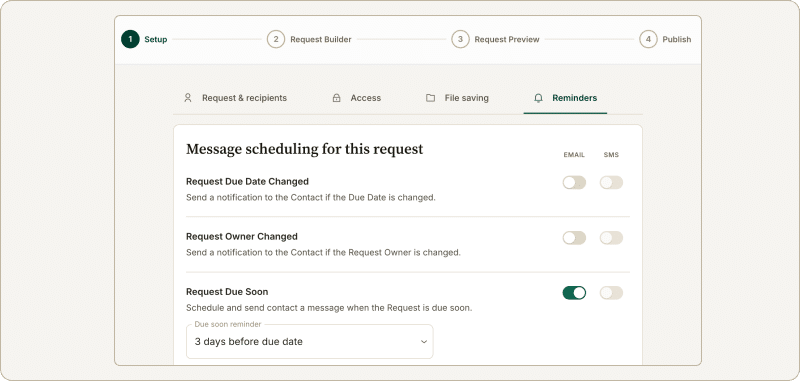
- Open or create a request.
- Navigate to the Setup step → Reminders tab.
- Toggle each of the Reminder types on/off as required.
- To limit the number of reminders that are sent out, scroll down to the green “Stop overdue reminders after…” section.
- For each step, choose whether each reminder sends by email, SMS, or both.
- Save your request settings.
Editing the Reminder Message
Reminder message text is set at the user level, not per request.
- Go to My Account → Automated Reminders.
- Select Edit next to the reminder you want to change. Switch between the message for Email and SMS by selecting the correct tab at the top.
- Update the message text.
- Save. This becomes your default reminder message going forward, across your requests.
Global Override: when an account owner switches this on, message editing moves to the account level. One set of reminder text applies to every team member, and individual users lose the ability to edit their own. We suggest using dynamic fields to populate names and request names.
Stopping Reminders for Overdue Requests
- Open the request.
- Go to Setup step → Reminders tab.
- Disable the Request Overdue toggle.
- Save changes.
Global Reminder Defaults
Set default reminder behaviour for all new requests under My Account → Automated Reminders. These settings apply only to requests created after you save them, not to existing ones.
Global Override: Account owners have an extra Global Override button here. Switching this on forces the account-wide reminder settings, including message text, onto every team member’s requests and templates, overriding whatever they’ve set individually. Use this when you need consistent reminder behaviour across the whole team, and be aware it removes each member’s ability to customise their own settings until it’s switched off again.
Reminders on Templates
Templates can carry their own reminder schedule, set up under Advanced Template Settings. A request created from a template inherits that template’s reminder settings.
If Global Override is switched on, it takes precedence over template settings too. The account-wide schedule and message apply to requests built from a template, the same as any other request, until Global Override is switched off.
What Happens When Reminders Run Out
If you’ve set a maximum number of reminders under Stop Sending After, Gatheroo sends that number of reminders on your configured cadence.
Where the Overdue Reminders Ended option has been toggled on, one final message on the next scheduled date letting the client know no further reminders are coming. This final message is editable in the same way as your other reminder messages, and it doesn’t count toward your maximum reminder number.
Multiple Recipients on One Request
Where a request has more than one recipient (for example, joint applicants), everyone on that request follows the same reminder schedule. You can’t set a different cadence for individual recipients within one request.
If a recipient is added partway through, they join the schedule at the point they’re added. They don’t get their own reminder count starting from zero, and they don’t receive the reminders that already went out before they joined.
Manual Reminders
If you need to manually trigger a reminder outside the schedule, resend the original invitation email from the request.
Timezone
Reminders send according to your account’s local timezone, set under Local Timezone in Global Settings, regardless of where your client is located.
SMS Reminders
SMS reminders are optional and available on all subscription tiers, but require SMS credits on your account. See SMS Credits and SMS Reminders for setup.
If a reminder is set to send by SMS and either your SMS credits have run out or the message can’t be delivered (no phone number on file, or an incorrect one), Gatheroo sends an email reminder instead, so the client is never left without a nudge.